1What Dev Radar is
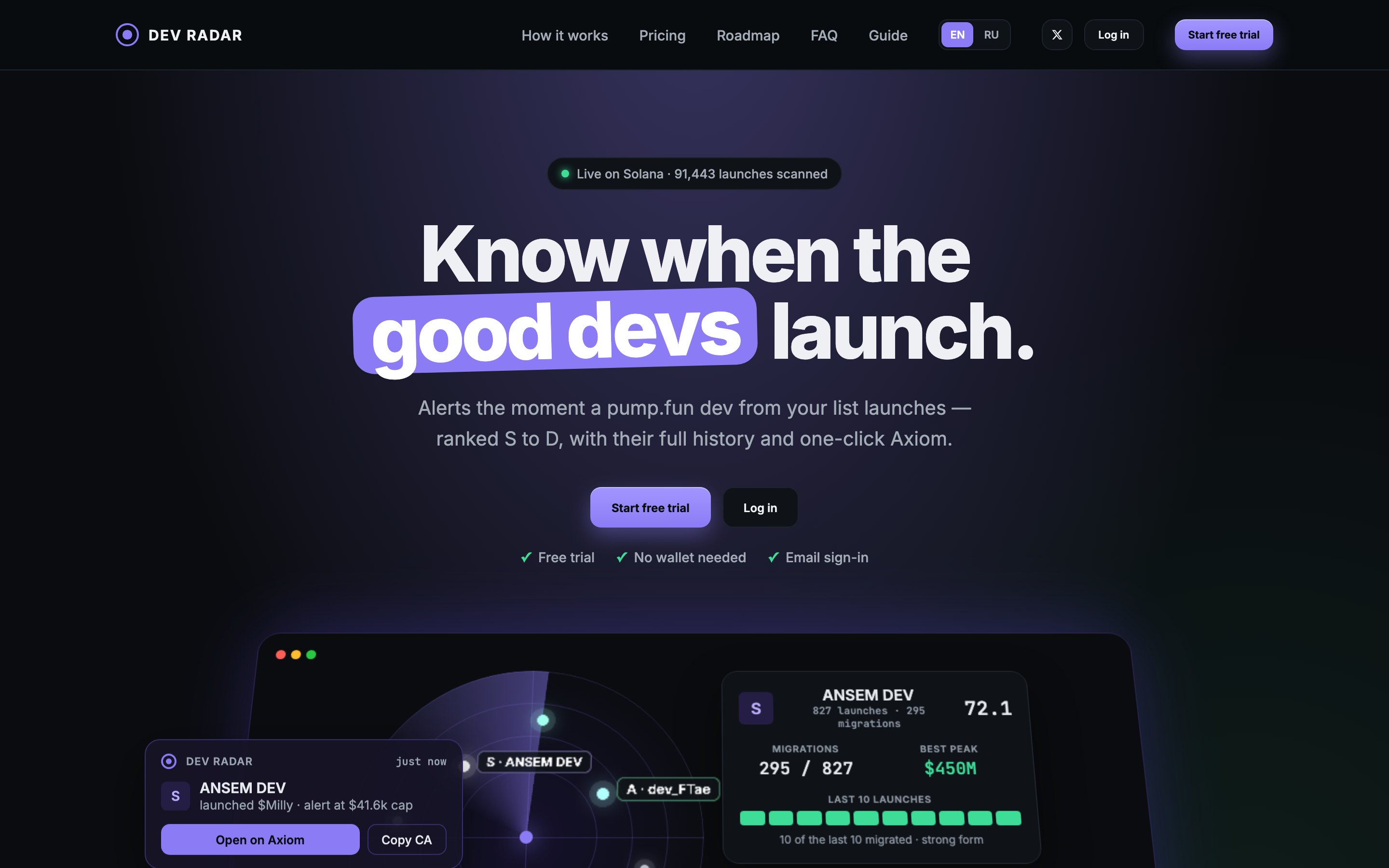
Dev Radar watches the pump.fun developers you choose and alerts you the moment one of them launches a token.
On pump.fun, thousands of tokens launch every day and most go nowhere. A small share of developers ("devs") launch tokens that repeatedly get traction. If you already know who those devs are, the hard part is noticing their next launch in time. They launch at odd hours and often from brand-new wallets.
Dev Radar does that watching for you:
- Instant alerts. A launch from a dev on your list appears in your feed, with a sound and a browser notification. Typical delay from launch to alert is under a second.
- A rank for every dev. Each dev gets a rank from S to D based on their real launch history, so you can see at a glance who deserves attention.
- Fresh-wallet tracking. When a dev funds a new wallet, the radar starts listening to it, so a launch from that wallet still reaches you.
- Full context in one place. Migrations, peaks, the last 10 launches, usual launch hours and the dev's sells, plus one-click buttons to copy the contract address (CA) or open the token on Axiom or GMGN.
Where it works: in a desktop browser. Solana is supported now; BNB Chain, Ethereum and Robinhood Chain are in progress. There is no mobile version yet.
2Quick start in 5 minutes
Create your account
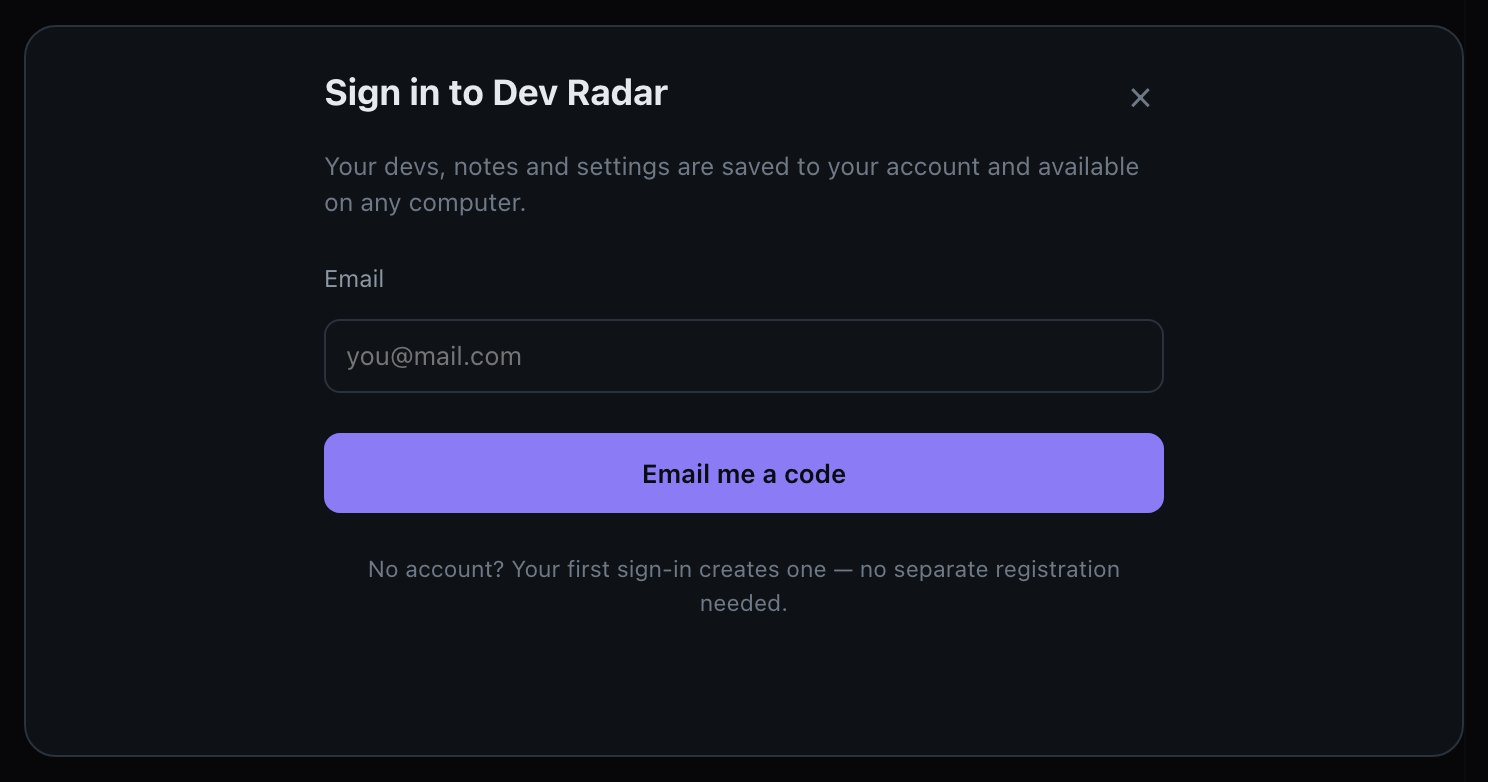
Go to devradar.xyz and press Start free trial. Enter your email and press Email me a code. Type the 6-digit code from the email. There is no password and no separate registration: your first sign-in creates the account. If the email doesn't arrive within a minute, check your spam folder.
Your first devs are already on the list
On the trial the radar adds 40 devs right away: 5 S, 10 A, 15 B and 10 C. It is one set for everyone, starting with devs who launched this week. Alerts for them arrive without delay, as fast as with a subscription.
The other devs appear under Locked with their rank and approximate numbers, without names or wallets. If you remove a dev from the set by mistake, press Restore devs from your set.
Turn on sound and notifications
Browsers block sound and notifications until you allow them:
- Sound: click anywhere on the page. If you see a yellow "Sound is blocked by the browser" button in the header, press it.
- Notifications: press the bell icon in the header and allow notifications in the browser prompt.
Keep the tab open
Alerts reach you through the open dashboard tab. It can sit in the background, but it must stay open and your computer must stay awake. If the tab was closed, recent launches are still waiting in the feed when you come back.
When an alert arrives
Click the row to open the dev's card on the right. Check the rank, recent form and the dev's sells, then use CA, Axiom or GMGN if you decide to act.
3Key terms
| Term | Meaning |
|---|---|
| Dev | The person behind a token launch. In Dev Radar, a dev is one or more wallets. |
| Launch | A dev creates a new token. |
| CA | Contract address: the token's unique address. You paste it into a trading terminal to find the exact token. |
| Market cap | Token price multiplied by total supply. Dev Radar shows it in dollars. |
| Bonding curve | The pump.fun mechanism that sets a new token's price as people buy and sell. |
| Migration | The bonding curve fills up and the token moves to a regular liquidity pool. Most tokens never get this far. |
| ATH / Peak | The highest market cap a token has reached. |
| Alert cap | The market cap at the moment the alert fired. |
| Funder | A wallet that sends SOL to a dev's launch wallets. |
| Linked wallet | A wallet the radar tied to a dev by following the money, not one you added yourself. |
| Suspect | A new wallet recently funded by a dev. The radar listens to it for 72 hours in case it launches. |
| Buyout (self-migration) | A dev buys up their own curve so the token "migrates" without real demand. These don't count toward the rank. |
| Bundle | Buying a token from many wallets at launch. "Preparing bundle" means a dev has just sent small amounts of SOL to many wallets. |
| Candidate | A dev outside your list who looks promising. The radar suggests; you decide. |
| ×2, ×5 | How many times the market cap grew from the alert cap to the peak. |
4How the radar works
Two independent sources
The radar receives every new pump.fun token in real time and also listens directly to the wallets of tracked devs on the Solana network. Whichever source sees a launch first triggers the alert. The wallet channel also sees the dev's sells and transfers.
Catching fresh wallets
Many devs launch from a new wallet each time. The radar handles this in three ways:
- When a tracked dev or their funder sends at least 0.05 SOL to a new wallet, that wallet becomes a suspect and the radar listens to it for 72 hours.
- When an unknown wallet launches a token, the radar checks who funded it. If the money came from a known wallet of the dev, the launch is linked to that dev.
- Wallets that fund everyone, such as exchanges and mixers, are detected and ignored, so they can't tie strangers to a dev.
Only the real launcher counts
A launch is credited to a dev only if the dev's wallet actually signed the transaction. Being mentioned in someone else's transaction doesn't count, which prevents false alerts.
If the radar was offline
After any downtime, the radar checks what your devs launched in the meantime and adds it to the feed marked missed, with current data. A banner shows the period when it wasn't running. Missed launches never had a live alert, so their Alert column is empty.
5Ranks S to D
The rank answers one question: how likely is this dev's next launch to take off? It isn't a count of past wins, because a spammer with 2,000 launches will get some migrations by chance.
What goes into the score
- Migration rate. Recent form counts more: 60% is the last 10 launches and 40% is the full history.
- Share of tokens that peaked above $100k.
- Share of tokens that peaked above $1M, which carries the most weight per token.
Rates are smoothed toward the market average, so one lucky launch can't produce a top rank.
| Rank | Score | Example history |
|---|---|---|
| S | 50+ | 12 launches, 8 migrations, 6 above $100k, 2 above $1M |
| A | 30+ | 5 launches, 3 migrations, 1 above $100k |
| B | 15+ | 40 launches, 5 migrations, 2 above $100k |
| C | 7+ | 1 launch, 1 migration |
| D | below 7 | 2,000 launches, 30 migrations (a spammer) |
Protection against fake history
- Buyouts. If fewer than 100 transactions happened on the curve, the dev bought it out personally. It isn't counted as a migration or a peak. A dev with at least as many buyouts as real migrations always gets D.
- Inflated peaks. A peak more than 1,000 times above the current market cap is treated as a spike on an empty pool and ignored.
Set your own rank
Open the dev's card, go to Manage and choose a class. Your choice applies only to you, and it changes which notifications you get for that dev. Choose Auto to go back to the calculated rank.
6The dashboard at a glance
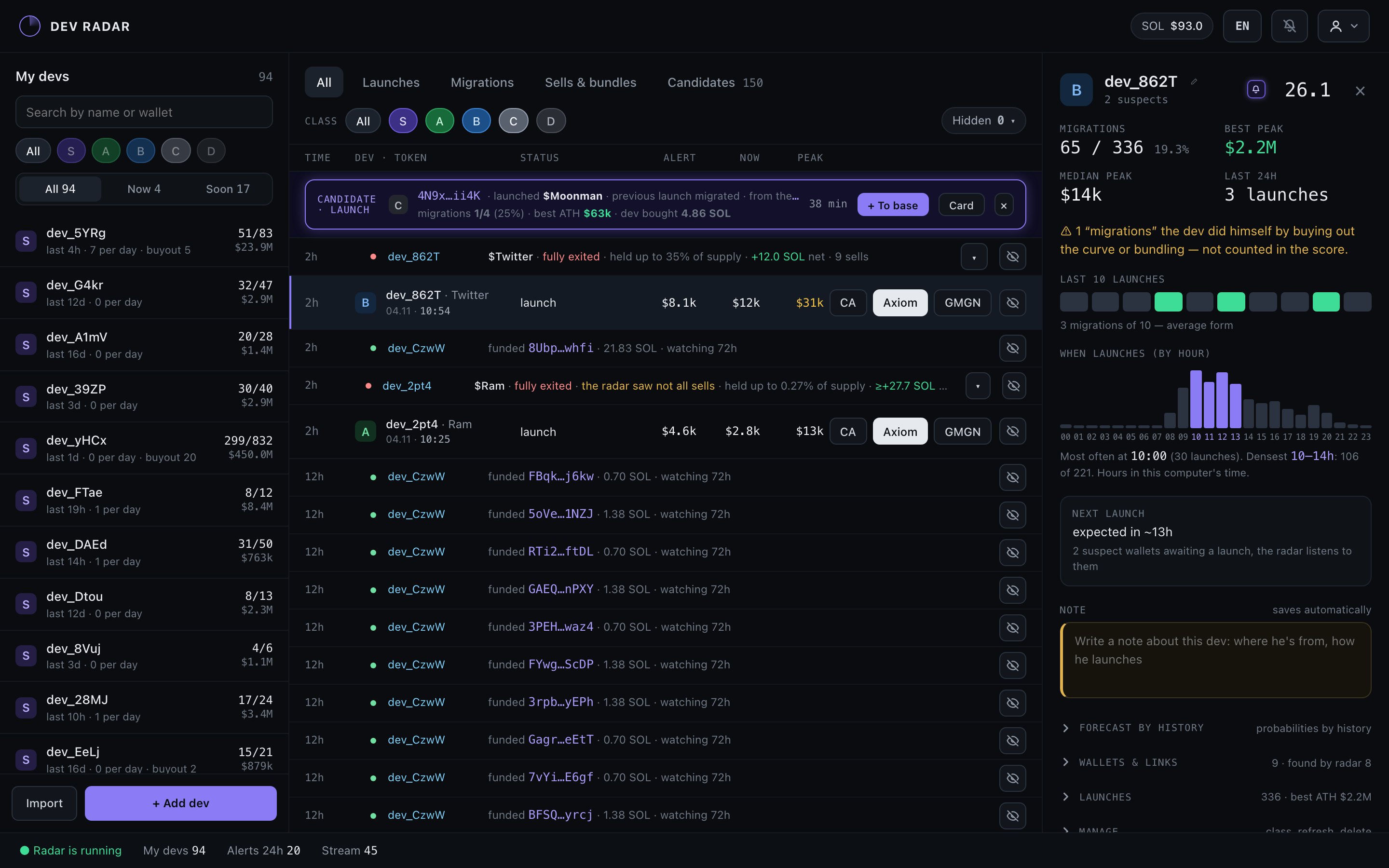
The dashboard has three panels: your devs on the left, the live feed in the center and the selected dev's card on the right. Drag the border between panels to resize them; double-click the border to reset.
 123456789
| 1 | Your devs, sorted by rank. Search by name or wallet and filter by rank above the list. | 6 | Actions: copy the CA, open on Axiom or GMGN, hide the row. |
| 2 | All / Now / Soon: who is inside their usual launch hours now or will be within 6 hours. | 7 | Dev card: statistics, launch hours, note and wallets. |
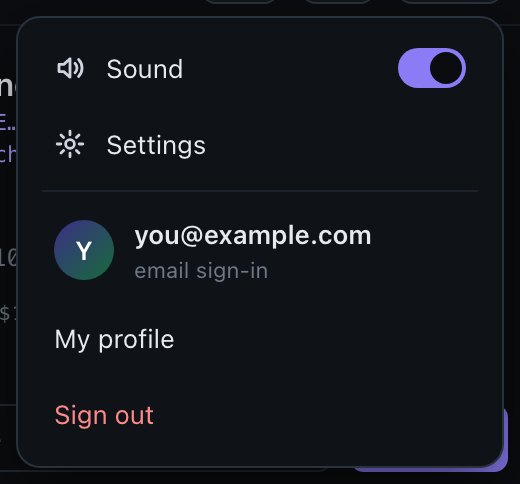
| 3 | Feed tabs: All, Launches, Migrations, Sells & bundles, Candidates. | 8 | Header: language, notifications on/off, menu with sound, settings, profile and sign-out. |
| 4 | Class filter (several can be selected) and the Hidden menu. | 9 | Import a list or + Add dev. |
| 5 | Live feed. Click a row to open that dev's card. |
The bar at the bottom shows that the radar is running, plus your dev count, alerts in the last 24 hours and the current launch stream on pump.fun.
Keeping the feed clean
The feed doesn't shift while your cursor is over it, so you won't click the wrong row; new events wait behind a bar at the top. The eye icon hides a row. The Hidden menu hides everything older than 1 hour, 6 hours or a day, or everything visible, and Show hidden brings rows back. Hiding deletes nothing, and price tracking continues. The feed keeps 14 days of events.
7The live feed
Launch rows

| Column | What it shows |
|---|---|
| Time | Time since the launch. For the first 59 seconds it glows bright green. |
| Dev · Token | The dev's rank and name, the token, and the exact date and time. |
| Status | What kind of event this is (see the table below). |
| Alert | Market cap when the alert fired. |
| Now | Current market cap. Updated for 24 hours after the alert. |
| Peak | The highest market cap so far. |
| Colors | White: under $15k. Yellow: $15k or more. Green: $45k or more, or the token migrated. |
What the status means
| Status | Meaning |
|---|---|
| launch | A launch from a wallet on the dev's list. |
| launch · linked wallet | From a wallet the radar tied to the dev by following the money. Hover to see the funding source. Doesn't count toward the rank. |
| launch · suspect | From a new wallet the dev recently funded. This is the weakest type of link, so check it. |
| N% of funds from the dev | Experimental: the share of the wallet's SOL before launch that came from the dev. Under 50% appears in yellow and means the link is weaker. |
| missed | Launched while the radar wasn't running. The data is current, not from launch time. |
| not dev · link not confirmed | The radar first linked this wallet to the dev, then a stricter check rejected the link. Ignore it. |
| migrated | The dev's token completed its curve. |
Other rows
- Funded XXXX… · N SOL · watching 72h — the dev funded a new wallet, a possible sign of an upcoming launch.
- Preparing a bundle — the dev sent small amounts to many wallets within 10 minutes.
- Sells — one summary line per token (section 10).
- Candidate — a new promising dev outside your list (section 9).
8The dev card and managing devs
Top of the card
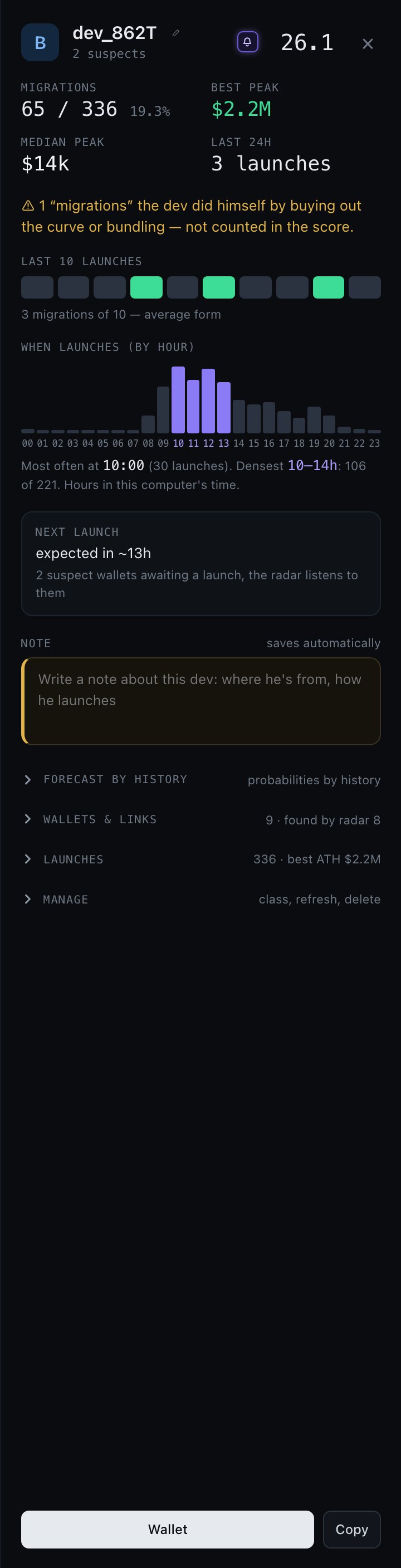
- Rank and score.
- Migrations: real migrations out of all launches.
- Best peak and median peak.
- Last 24h: launches today. Many launches in a burst usually means lower quality.
- Warning: how many "migrations" were buyouts.
- Last 10 launches: green squares migrated. This is the dev's recent form.
- When launches: launches by hour in your computer's time. The purple bars are the dev's busiest 4-hour window.
- Next launch: an estimate from the dev's usual gap between launches.
- Note: your private notes, saved automatically.
Sections below
- Forecast by history: estimated chances for the next launch.
- Wallets & links: all wallets, their roles, and how long a suspect is still watched.
- Launches: every token with its peak and a CA button. Show all opens the full history; CSV exports it.
- From linked wallets: launches not counted toward the rank.
- Manage: class, Refresh history, Delete.
The buttons at the bottom open the wallet on Solscan or copy its address.
Add devs
+ Add dev → One by one: paste the Solana address, and optionally add a name, a class and a note. The radar loads the dev's history and calculates the rank within seconds. As a list: paste many addresses, one per line, as address name note or CSV wallet,name,note,class.
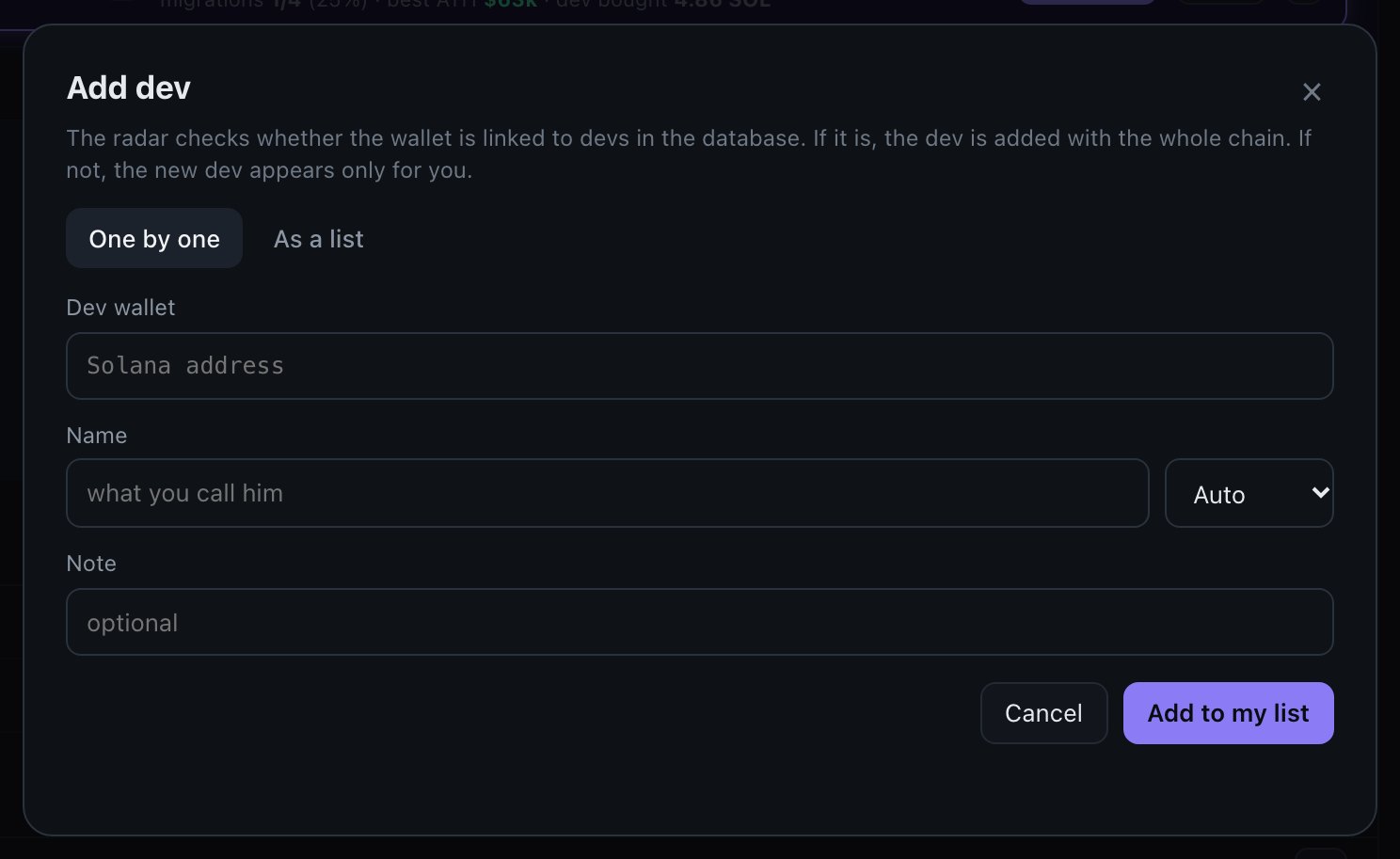
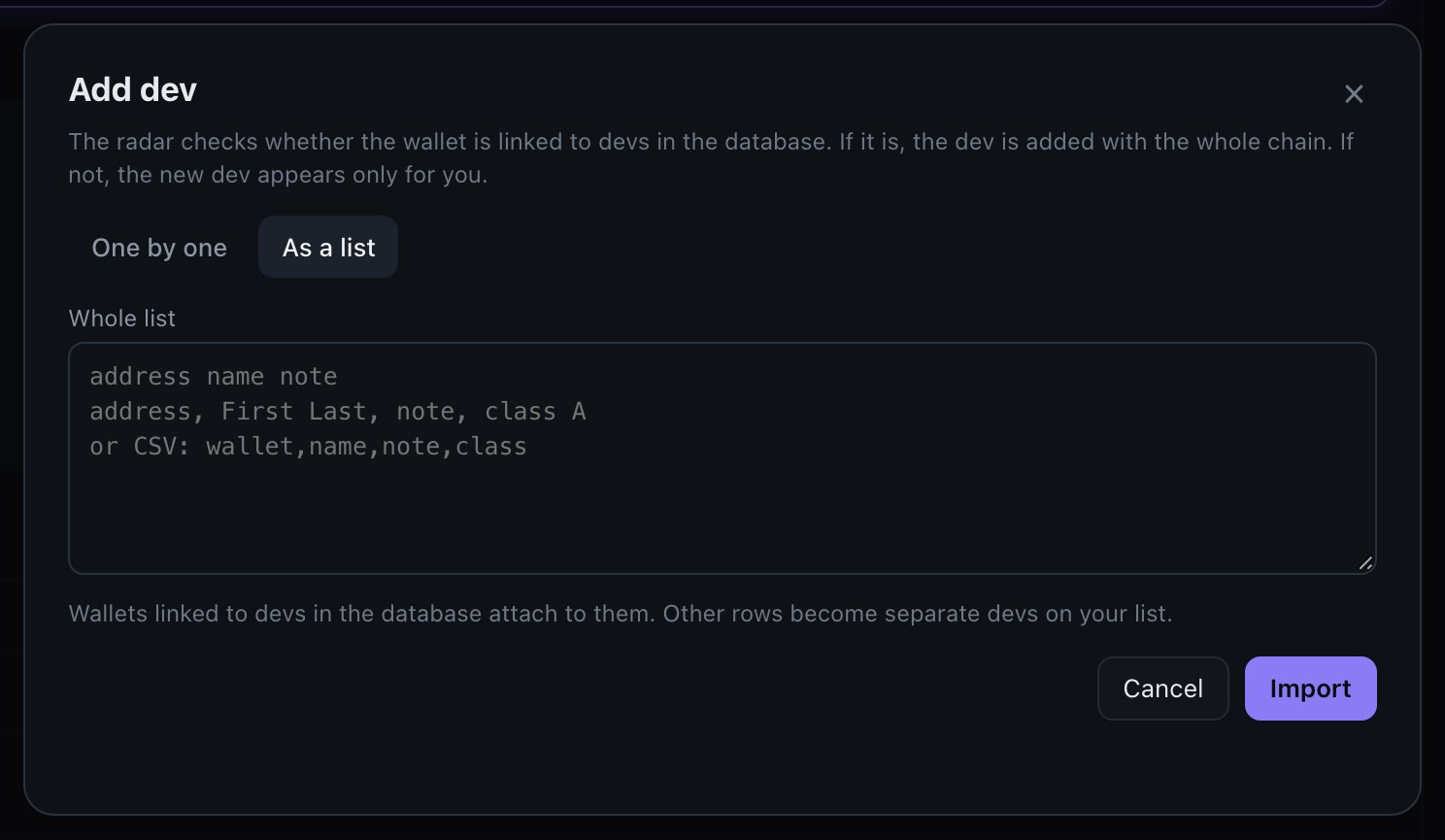
To keep the radar fast for everyone: up to 200 rows in one import, 300 devs on a list and 100 new devs added to tracking per account. List import comes with a subscription; on the trial you add wallets one by one, up to 5.
Linked wallets. When you paste a wallet, the radar checks it right away. If it's already in the database, or transfers link it directly to a known dev, you see the link highlighted and the dev is added to your list with the whole chain of wallets. If there's no link, it becomes your own new dev, visible only to you. Linked wallets you add produce alerts but don't change the dev's rank.
Wallets of a shared dev. You can't edit these by hand in the card. Paste another wallet into + Add dev, and the radar attaches it if the transfers confirm the link. On a dev you added yourself and no one else follows, the card also lets you add wallets by hand.
Rename a dev
Double-click the name in the list or card, or press the pencil, type a new name and press Enter. Only you see this name, and it replaces the default in your list, card and feed. Clear the field and press Enter to restore the default name, which is dev_ plus the first 4 characters of the wallet.
Mute one dev
Press the small bell next to the score in the dev's card. The dev stays in your list and feed, but their events arrive without sound or notifications. A crossed-out bell marks muted devs in the list and the feed.
Remove a dev
Open the card, go to Manage and press Delete. This removes the dev from your list only. Other users aren't affected.
9Candidates: finding new devs
This tab comes with a subscription and is closed during the trial.
The radar looks at tokens that migrate on pump.fun, evaluates who created them, and offers devs ranked B or higher in the Candidates tab. Each row shows the wallet, the token that brought them to attention, the rank, migrations, migration share and best peak.
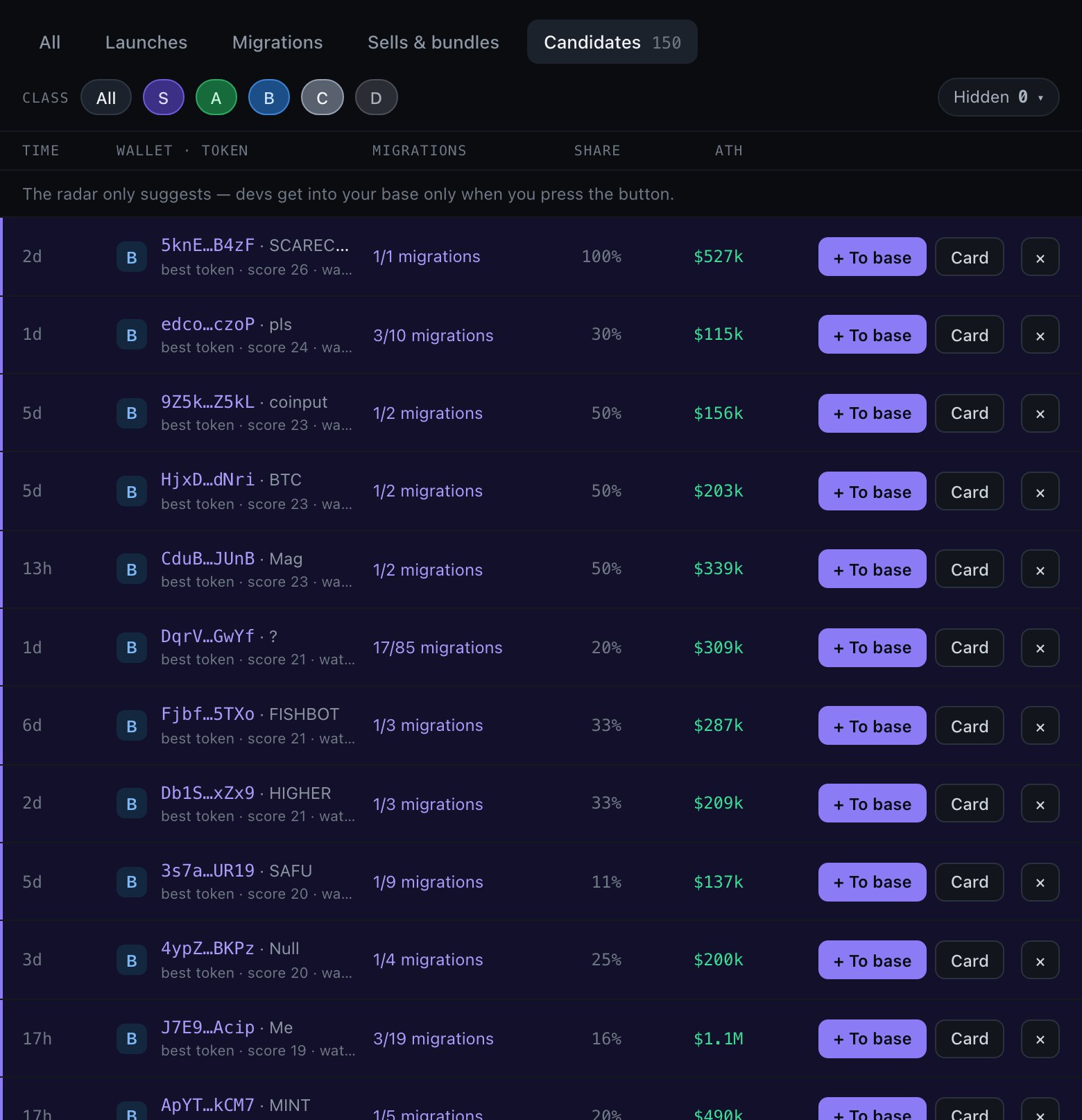
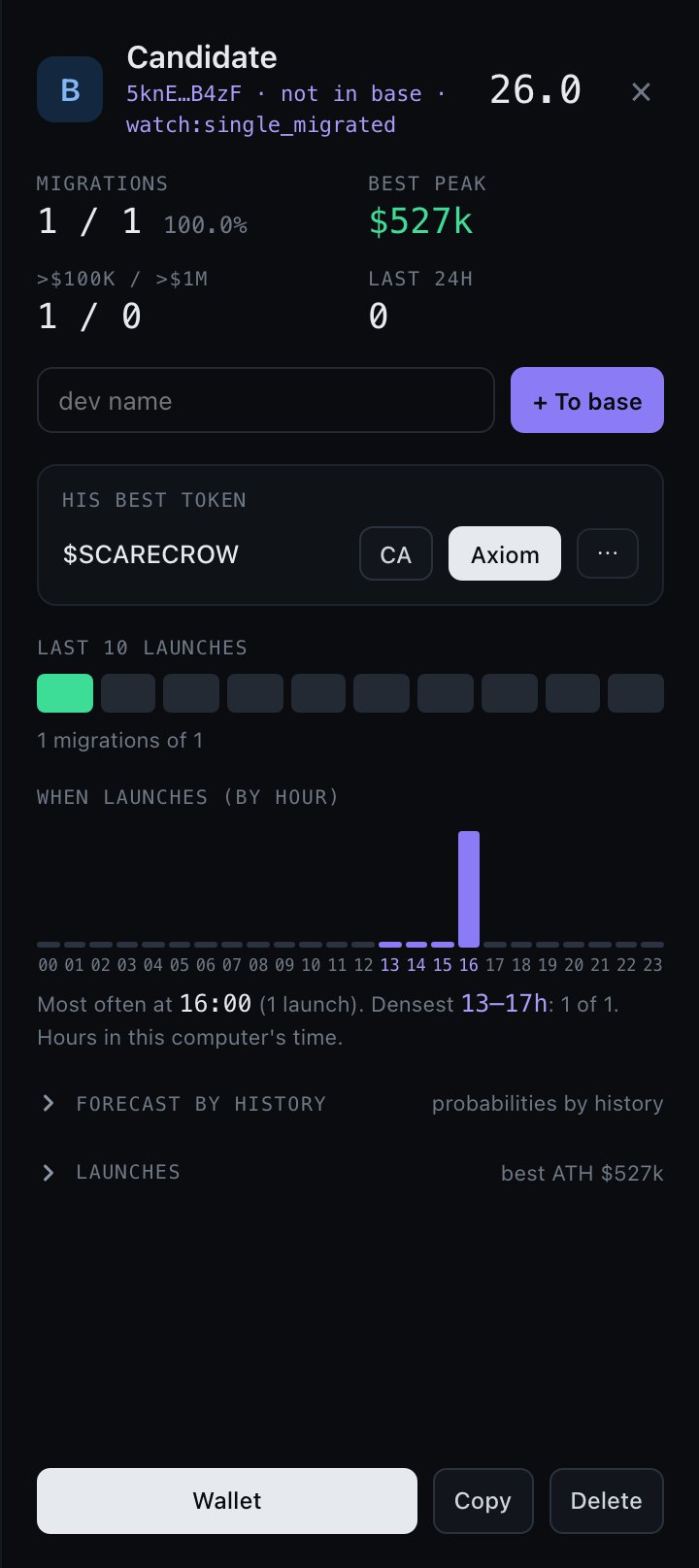
- Card opens the same statistics as a dev card, without adding the dev.
- + To base adds the dev to your list. You can name them first.
- × removes the candidate from your suggestions.
- Candidate · launch in the feed means a wallet from the radar's background list has just launched a token. These wallets stay out of sight until they launch.
- How many launches is the rank based on? "1/1 migrations" looks perfect but is one data point.
- Are there buyouts?
- Do the last 10 launches look alive, or was there one old hit?
So far, B-rank candidates have migrated on their following launches at about the same rate as the devs already in the base. Treat them as ideas to review, not as a finished list.
10Sells & bundles
The Sells & bundles tab shows what devs do with their own tokens. All sells of one token are combined into one line: fully exited or sells, the share of supply the dev held, the net SOL result and the number of sells. A bot churns volume label means the dev's wallets buy back after selling.
Press ▾ to expand the timeline (launch, first sale, big sale, exit) and a table per wallet.
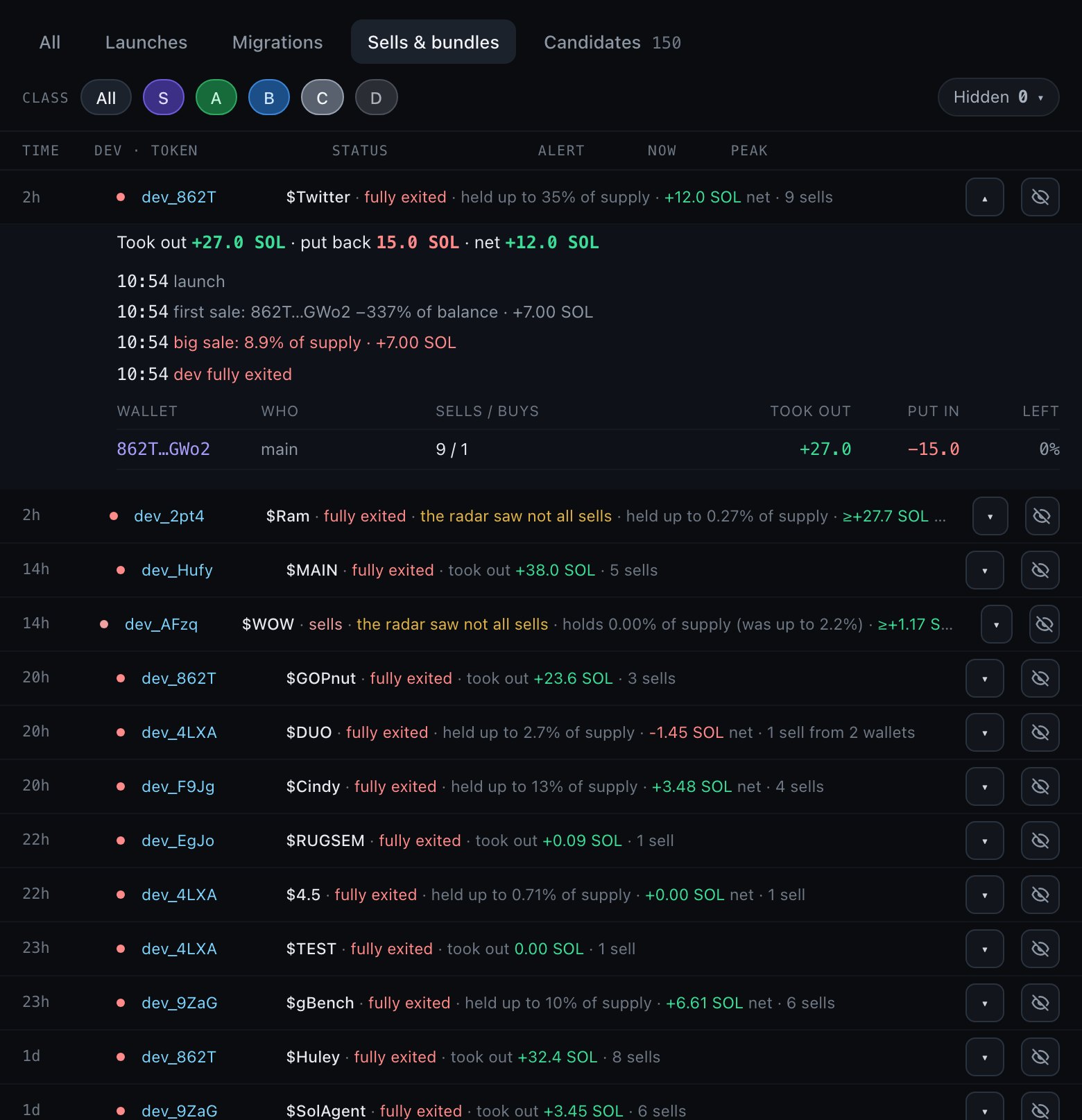
- "The radar saw not all sells" with a ≥ sign: the balance check found fewer tokens than the recorded sells explain, so the numbers are "at least".
- Notifications fire only for the first sell, a big sell (1% of supply or more at once) and a full exit.
11Notifications and settings
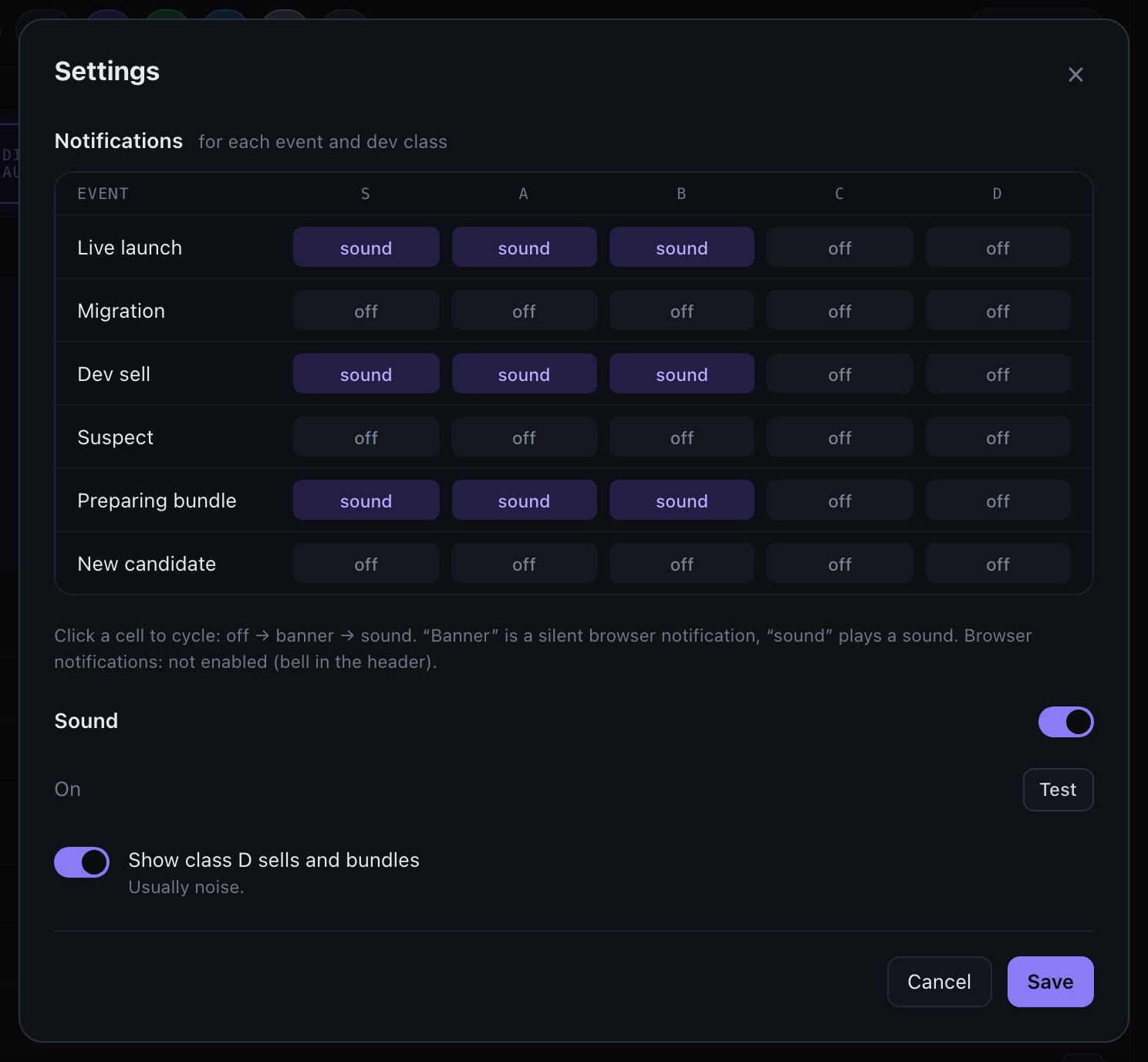
Open the menu at the top right and choose Settings. For each event type and rank, click a cell to cycle through:
- off — appears in the feed only.
- banner — silent browser notification.
- sound — sound and a notification.
By default, you get sound for launches, dev sells and bundle preparation from S, A and B devs. Everything from C and D stays quiet.
Sound switches all sound on or off; Test plays a sample. Show class D sells and bundles hides or shows that usually noisy group. Press Save when done.
- Header bell — browser notifications overall.
- Settings table — rules by event and rank.
- Bell in a dev's card — mutes that dev only.
Your settings belong to your account and are saved on the server. Sound and notifications require an open dashboard tab. Telegram alerts for all users are on the roadmap.
Language: use the RU / EN button in the header.
12What to expect: real numbers
These are results from 602 real alerts between October 19 and November 3, 2026. They measure growth from the market cap at the alert. They aren't trading results and don't include your entry price, slippage or fees.
| Dev's rank at alert | Alerts | Peak ×2+ | Peak ×5+ | Reached $100k |
|---|---|---|---|---|
| S | 65 | 31% | 12% | 12.3% |
| A | 46 | 54% | 15% | 2.2% |
| B | 230 | 45% | 10% | 1.3% |
| C | 206 | 36% | 7% | 1.5% |
| D | 55 | 35% | 9% | 0% |
How to read this
- Pumps are short. Most tokens peak within minutes and then fall back. Only 9% were still above the alert cap at the last check. A dashboard peak is the best price anyone could have got, not what a typical buyer earned.
- Only S stands out for big runs. S devs reached $100k far more often. For quick ×2 moves, rank made little difference in this sample, and some groups are small.
- Rank is more useful in history than as a timing tool. In a backtest of 120 devs, A-rank launches migrated at 11.7% and D-rank at 2.2%, about 5 times more. That sample is small and doesn't measure profit.
- The forecast in the card is optimistic. Live alerts have migrated less often than it suggests. Use it to compare devs with each other, not as a real probability.
A sensible way to work
- Start with a short list of S and A devs. A long list of weak devs creates noise.
- Check the Now and Soon tabs to see who may launch.
- When an alert comes, look at recent form, the link type and how the dev usually behaves after launch.
- Write notes in the card about how each dev behaves. Your notes are private.
- Mute devs who turn out to be noise and review your list regularly.
13Questions and troubleshooting
Alerts
- I hear no sound.
- Browsers block sound until you interact with the page. Click anywhere or press the yellow "Sound is blocked" button. Then check the switch in the menu and press Test in Settings. Also check the rule for that event and rank, and whether the dev is muted.
- I get no browser notifications.
- Press the bell in the header and allow notifications. If you blocked them earlier, click the icon left of the site address, allow notifications and reload. Check that your system's Do Not Disturb mode is off. Notifications appear when the tab is in the background; if you're looking at the tab, the row and sound are the alert.
- Do I need to keep the site open?
- Yes, for sound and notifications. Launches are still recorded while the tab is closed, and you'll see them in the feed when you return.
- Why was a launch marked "missed"?
- The radar wasn't running at that moment. It found the launch afterward and added it with current data.
- Why did I get no alert for a dev's launch?
- Check that the dev is on your list and that the launch came from a known or linked wallet. A launch from a wallet with no traceable link to the dev can't be recognized. Add new wallets you find through the dev's card.
- Is the alert fast enough to buy first?
- No alert can promise that. Typical delay is under a second, but bots act within the same block. Dev Radar gives you information early, not a guaranteed entry.
- Why is the Alert column empty?
- The launch was missed, or the market cap wasn't known at the alert moment. In that case, the value comes from the first check after the alert.
Devs and ranks
- Why are the names like dev_5YRg?
- That's the default: dev_ plus the first 4 characters of the wallet. Rename any dev for yourself by double-clicking the name.
- Can other users see my devs, names or notes?
- No. Your list, names, notes, personal ranks, hidden rows and settings are visible only to you.
- Why did a dev's rank change?
- Ranks follow new launches, and the last 10 launches carry extra weight. A manual class stays until you change it.
- Why does a dev with big peaks have a low rank?
- Probably many launches with a low success rate, poor recent form or buyouts. Check the warning and the last 10 launches in the card.
- Is one rank better for me than another?
- See section 12. S stands out for big runs; for short moves the difference is small.
- Can the radar link the wrong wallet to a dev?
- Yes, it can happen. That's why linked launches are labeled, don't affect the rank, and are marked "link not confirmed" if a later check rejects them.
- Does the radar add devs to my list by itself?
- No. It suggests candidates, and only your click adds them.
Account and trial
- The login code doesn't arrive.
- Check your spam folder and the spelling of your address. You can request a new code after 30 seconds.
- How long does a code last?
- 10 minutes, with 5 attempts. After that, request a new one.
- How long do I stay signed in?
- 30 days on each browser. Sign out from the menu at any time.
- Can I use it on several computers?
- Yes. Sign in with the same email and your list and settings will be there. Some display preferences, such as sound and language, are stored per browser.
- What does the free trial include?
- 5 days and 40 devs from a shared set: 5 S, 10 A, 15 B and 10 C. Alerts have no delay, and ranks and launch history are open. You can add up to 5 of your own wallets. A subscription unlocks the other devs, linked wallets, the Candidates tab and list import. One trial per mailbox.
- What happens after the free trial?
- Pick a plan to keep using Dev Radar. If you don't, nothing is deleted: your list, notes and settings stay saved, but all features pause until you subscribe.
- Do I need a wallet?
- No. You sign in with email only. Dev Radar never asks for a wallet connection, signatures or private keys. If anyone claiming to be Dev Radar asks for these, it's a scam.
Trading and links
- Does Dev Radar buy tokens for me?
- No. It only shows alerts and links. You buy on the platform you choose.
- Is this financial advice?
- No. Dev Radar shows on-chain data, not recommendations.
14Your account and getting help
Your profile
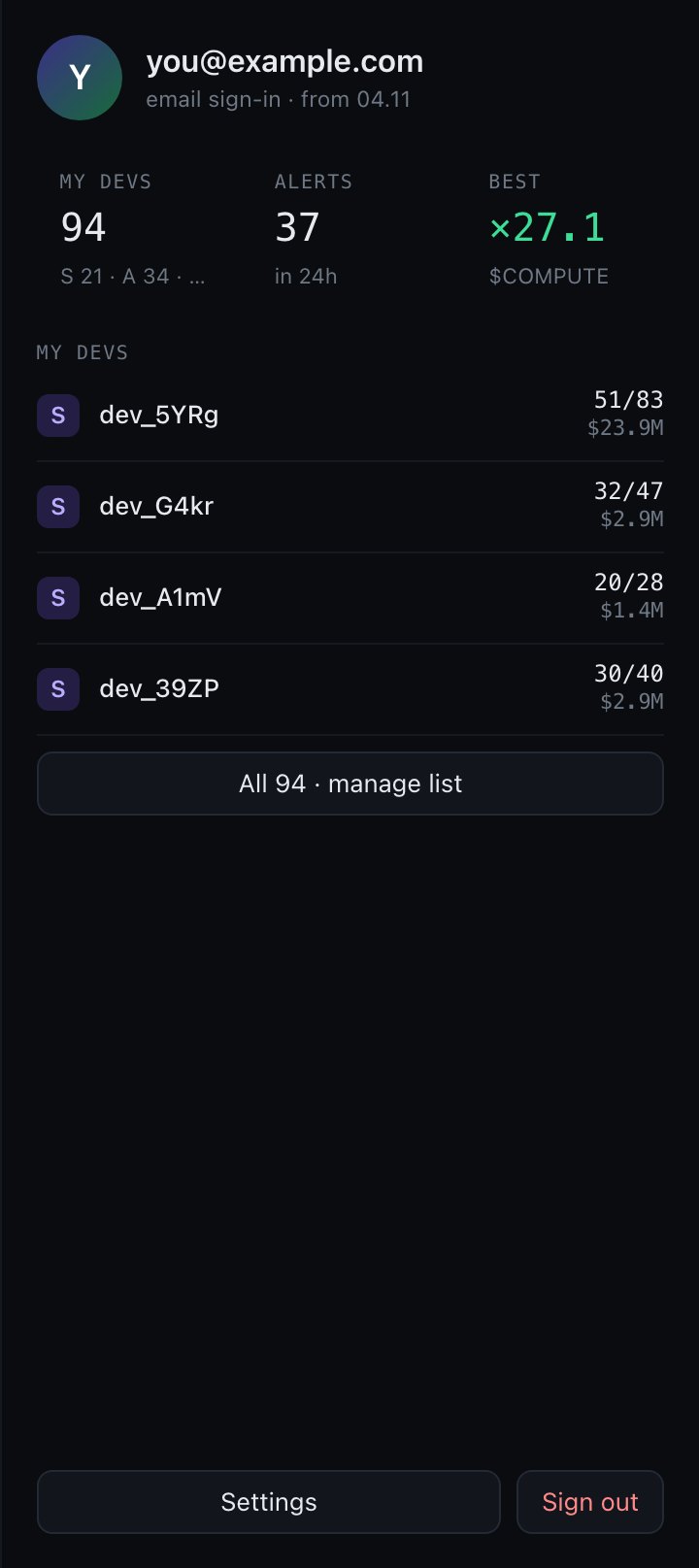
Click the empty area of the right panel, or choose My profile in the menu, to see your dev count, alerts in the last 24 hours and your best result of the week, plus shortcuts to settings and sign-out.
What we store
Your email, your dev list and names, notes, personal ranks, hidden rows and notification settings. No wallet is connected and no private keys or passwords are stored. Public on-chain data about devs and tokens is shared by all users.
Need help?
Email us: support.devradar@gmail.com · Follow and message us on X: @DEVRADARR · Website: devradar.xyz